
JSON Web Tokens (JWTs) power authentication and authorization in modern web applications, REST APIs, and other authentication systems. They allow applications to represent information about users, sessions, and other entities in a compact token format.
Developers frequently encounter JWTs when debugging authentication issues, inspecting API responses, or troubleshooting authorization problems. However, JWTs use an encoded format that makes their contents difficult to read until you decode them.
A JWT decoder makes this process easier by converting the token’s encoded components into readable information. You can inspect the header, payload, claims, and signature without manually working with Base64URL encoding.
In this guide, you will learn what JSON Web Tokens are, how their structure works, how to decode a JWT online, and what information you can discover inside a token.
You will also learn the difference between decoding a JWT and verifying its cryptographic signature.
What Is a JSON Web Token (JWT)?
The Internet Engineering Task Force (IETF) defines JSON Web Tokens (JWTs) in RFC 7519 as an open industry-standard format for representing claims between two parties.
Modern web applications and APIs use JWTs to handle authentication and authorization.They provide a compact way to transmit information between systems.
A JWT can contain information about a user, the token’s expiration time, the issuing authority, and other metadata.
For example, after a user successfully logs in to a web application, the server may issue a JWT that the application uses when making subsequent API requests.
Instead of repeatedly sending login credentials, the application can include the token in its requests so the server can identify and authorize the user.
JWTs are particularly common in:
- REST APIs
- Single-page applications
- Microservices
- User authentication systems
- Authorization workflows
- Secure communication between application components
What Does a JWT Look Like?
A standard encoded JWT consists of three Base64URL-encoded components separated by dots (.).
The general structure looks like this:
header.payload.signature
Each component has a specific purpose.
1. JWT Header
The header contains metadata about the token, typically including the token type and the signing algorithm.
For example:
{
  "alg": "HS256",
  "typ": "JWT"
}
Here:
algidentifies the signing algorithm.typidentifies the token type, commonly JWT.
The algorithm specifies the cryptographic method associated with the token’s signature.
Common algorithm identifiers include:
- HS256: HMAC using SHA-256
- HS384: HMAC using SHA-384
- HS512: HMAC using SHA-512
- RS256: RSA signature with SHA-256
- ES256: ECDSA using P-256 and SHA-256
The header helps applications understand how the token is structured and which algorithm it uses to handle the signature.
2. JWT Payload
The payload contains the claims, which are statements about an entity or additional information associated with the token.
For example:
{
  "sub": "1234567890",
  "name": "John Doe",
  "role": "admin",
  "iat": 1735689600,
  "exp": 1735693200
}
In this example:
subidentifies the subject of the token.namecontains a sample user name.rolerepresents an application-specific claim.iatindicates when the token was issued.expindicates when the token expires.
JWT claims are generally divided into three categories.
Registered Claims
Registered claims are standardized claim names defined by the JWT specification.
Common examples include:
| Claim | Meaning |
|---|---|
| iss | Issuer of the token |
| sub | Subject of the token |
| aud | Intended audience |
| exp | Expiration time |
| nbf | Not before time |
| iat | Issued at time |
| jti | Unique identifier for the token |
Public Claims
Public claims use custom names that different applications and systems can share.
Their names should be chosen carefully to avoid conflicts with other claims.
Private Claims
Private claims are custom values agreed upon between the systems using the token.
For example, an application might include claims such as role, department, or permissions.
These claims are application-specific and are not automatically standardized by JWT.
3. JWT Signature
The signature helps applications verify that nobody has modified the token. Depending on the signing algorithm, it can also help authenticate the party that created the token.
The signature is generated using the encoded header, encoded payload, and the appropriate cryptographic signing process.
If someone changes the header or payload without producing a valid new signature, signature verification should fail.
An important distinction is that a JWT signature does not automatically encrypt the token’s contents. In a typical signed JWT, the header and payload can be decoded and read by anyone who has the token.
Never place passwords, private keys, or other sensitive information in an ordinary JWT payload.
What Is a JWT Decoder?
A JWT decoder is a tool that converts the encoded components of a JSON Web Token into readable information.
Instead of manually separating the token and decoding its Base64URL components, you can paste the complete JWT into a decoder and inspect its contents.
A JWT decoder typically allows you to view:
- The decoded header.
- The decoded payload.
- Registered and custom claims.
- The encoded signature string.
This is particularly useful when debugging authentication problems, investigating API responses, and reviewing token structures during development.
How to Decode a JWT Online Using OffSecPath
You can decode a JSON Web Token using the free OffSecPath JWT Decoder.
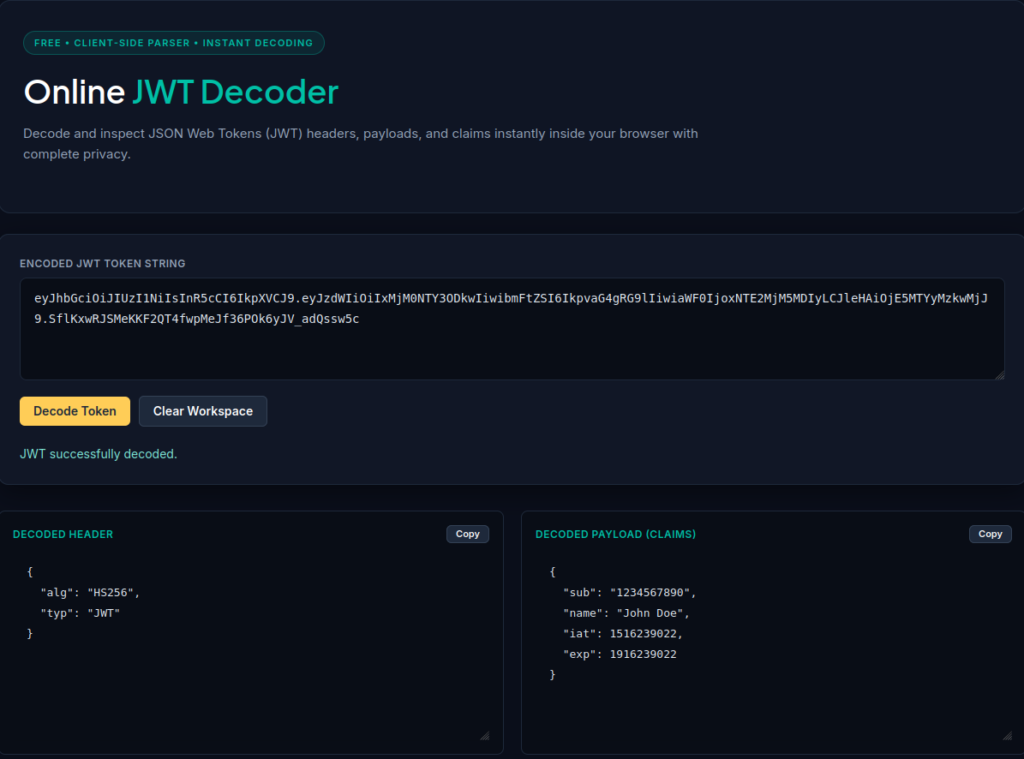
Open the tool here:
Open the OffSecPath JWT Decoder
Follow these general steps:
Step 1: Obtain Your JWT
Copy the JWT from your application’s authentication response, API request, browser developer tools, or debugging environment.
A typical JWT consists of three sections separated by two dots.
For example:
eyJhbGciOiJIUzI1NiIsInR5cCI6IkpXVCJ9.eyJzdWIiOiIxMjM0NTY3ODkwIiwibmFtZSI6IkpvaG4gRG9lIn0.example-signature
This is an illustrative token structure, not a real authentication credential.
Step 2: Open the JWT Decoder
Visit the OffSecPath JWT Decoder.
The tool runs directly in your browser and is designed to decode JWT components without sending your token to a remote server.
Step 3: Paste Your Token
Paste the complete JWT into the decoder’s input area.
Make sure you include all three components and the dots separating them.
Step 4: Inspect the Decoded Information
The decoder processes the token and makes its components readable.
You can inspect the header and payload as JSON data and view the encoded signature string.
Review the claims to understand the token’s metadata, subject, issuer, expiration information, and any application-specific values included in the payload.
Step 5: Review the Token Information
Use the decoded information to troubleshoot authentication problems or understand how your application structures its tokens.
Remember that decoding does not establish whether the token is authentic, valid, or accepted by a server.
Why Use a Client-Side JWT Decoder?
JWTs can contain authentication-related information, including user identifiers, roles, permissions, and session metadata.
When debugging production systems, privacy and security should be important considerations.
Some online tools require users to submit tokens to remote servers for processing. Sending production authentication tokens or session claims to an unverified third-party service can introduce unnecessary security risks.
The OffSecPath JWT Decoder executes entirely client-side using JavaScript.
This means:
- Token parsing takes place in your browser.
- Your token is not sent to a remote decoding server by the tool.
- Token data is handled locally in browser memory.
- Parsed data is discarded when you close or refresh the page.
This approach helps reduce the exposure associated with submitting authentication tokens to external services.
However, client-side processing does not make it safe to expose a token publicly. Treat production tokens as sensitive credentials and avoid sharing them in screenshots, public repositories, or online discussions.
JWT Decoding vs. JWT Signature Verification
One of the most important things to understand when working with JWTs is the difference between decoding and verifying a token.
These are two separate operations.
JWT Decoding
Decoding converts the encoded header and payload into readable data.
It allows developers to inspect the token’s contents without requiring a secret key or public certificate.
However, decoding does not prove that the token was created by a trusted issuer or that its contents have not been modified.
JWT Signature Verification
Signature verification checks whether the token’s signature is valid for the supplied header and payload.
Depending on the signing algorithm, verification requires the appropriate secret key or public key material.
For example:
- HS256 requires the appropriate shared secret.
- RS256 requires the corresponding public key for verification.
Successful signature verification helps confirm that nobody has altered the signed content and that the signature matches the expected key.
Applications must also validate other relevant conditions, such as expiration time, issuer, audience, and allowed algorithms.
Can the OffSecPath JWT Decoder Verify Signatures?
No. The OffSecPath JWT Decoder only decodes and displays JWT components so users can inspect them more easily.
It displays the Base64URL-encoded signature string, but it does not perform full cryptographic signature verification.
Verification requires the appropriate cryptographic key material and additional validation logic.
Do not treat a successfully decoded JWT as an authenticated or trustworthy token.
Common JWT Claims You Should Understand
When inspecting a JWT payload, you will frequently encounter registered claims.
Here are some of the most important ones.
| Claim | Description |
|---|---|
| iss | Identifies the token issuer. |
| sub | Identifies the subject of the token. |
| aud | Identifies the intended recipient or audience. |
| exp | Defines the token expiration time. |
| nbf | Specifies when the token becomes valid. |
| iat | Indicates when the token was issued. |
| jti | Provides a unique identifier for the token. |
Some claims use Unix timestamps rather than readable date formats.
For example, iat and exp commonly contain the number of seconds since January 1, 1970 (UTC).
Understanding these values can help developers troubleshoot expired tokens, incorrect expiration settings, and authentication-related issues.
Common JWT Errors and Troubleshooting Tips
JWT errors can occur when a token contains invalid formatting, has expired, uses an incorrect signature, or does not meet the application’s requirements.
Here are some common problems developers encounter.
Invalid JWT Format
A standard compact signed JWT normally contains three Base64URL-encoded sections separated by two dots.
If the token is incomplete, contains additional characters, or has missing separators, decoding may fail.
Check that you copied the complete token.
Invalid Base64URL Data
JWT components use Base64URL encoding rather than ordinary Base64.
Invalid characters or malformed encoded sections can prevent successful decoding.
Make sure the token has not been accidentally modified when copying it.
Expired Token
A token may contain an exp claim that indicates its expiration time.
If the current time is later than the expiration timestamp, an application that enforces expiration should reject the token.
Inspect the exp claim when troubleshooting unexpected authentication failures.
Incorrect Signing Algorithm or Key
A token may fail signature verification if the application uses an incorrect algorithm, secret, or public key.
Decoding the token can help you inspect the algorithm specified in its header, but it cannot establish whether the signature is valid.
Invalid Issuer or Audience
Some applications validate the iss and aud claims.
An application may reject a token if an unexpected authority issued it or if the token targets a different application, even when its signature is valid.
Check the application’s expected issuer and audience values when investigating these errors.
Frequently Asked Questions
What does JWT stand for?
JWT stands for JSON Web Token. It is an open industry-standard format defined in RFC 7519 for representing claims between two parties.
How do I decode a JWT online?
You can decode a JWT by copying the complete token and pasting it into an online JWT decoder. The tool separates and decodes the token components so you can inspect the header, payload, and signature.
Can anyone decode a JWT?
Anyone with a typical signed JWT can decode its header and payload because JWTs encode these components using Base64URL rather than encryption.
This does not mean anyone can successfully verify its signature or create a valid replacement token.
Does decoding a JWT verify its signature?
No. Decoding only makes the token’s encoded contents readable. Cryptographic signature verification requires the appropriate key material and verification process.
Is the OffSecPath JWT Decoder safe to use?
The OffSecPath JWT Decoder processes tokens entirely client-side using JavaScript. The decoder does not send tokens to a remote server. Instead, it processes the data locally and keeps the parsed information in browser memory until the user closes or refreshes the page.
Nevertheless, production JWTs should always be treated as sensitive credentials. Avoid sharing them publicly.
Can I see the expiration time of a JWT?
Yes. If the token contains an exp claim, you can inspect its value in the decoded payload.
The value usually appears as a Unix timestamp in seconds. You can convert it into a human-readable date and time.
Does a JWT contain encrypted information?
Not necessarily. A typical signed JWT has an encoded header and payload that can be decoded and read. A signature provides integrity and authenticity checks, not confidentiality.
Encrypted JWTs use a different structure and are commonly referred to as JWE (JSON Web Encryption).
What is the difference between JWT and OAuth?
JWT is a token format, while OAuth 2.0 is an authorization framework.
OAuth 2.0 can use JWTs as access tokens, but access tokens do not have to be JWTs. The two terms describe different concepts.
Related Free Tools
Explore more developer and utility tools on OffSecPath:
- JWT Decoder: https://offsecpath.com/all-tools/encoders-validators/jwt-decoder/
- JSON Formatter and Validator: https://offsecpath.com/all-tools/web-dev-tools/json-formatter-validator/
- JSON Validator: https://offsecpath.com/all-tools/encoder-tools/json-validator/
- Secure Password Generator: https://offsecpath.com/all-tools/more-tools/password-generator/
- All Online Tools: https://offsecpath.com/all-tools/
Final Thoughts
JSON Web Tokens are an important part of modern authentication and authorization systems. Understanding their structure and claims makes it easier to debug APIs, investigate authentication issues, and work with modern web applications.
A JWT decoder simplifies this process by making encoded token components readable without requiring manual Base64URL decoding.
The OffSecPath JWT Decoder provides a convenient way to inspect JWT headers, payloads, and signatures directly in your browser, with client-side processing that avoids sending tokens to a remote decoding server.
Remember that decoding is not the same as verification. Always validate JWT signatures and relevant claims on the server side before trusting a token or using it to authorize access.