
Special characters can cause problems when you display text inside an HTML document. Characters such as the less-than sign, greater-than sign, ampersand, and quotation marks have special meanings in HTML. If you use them in the wrong context, a browser may interpret them as markup rather than ordinary text.
HTML entities provide a way to represent these characters using a format that browsers recognize. They also make it possible to represent symbols such as copyright signs, currency symbols, arrows, and other special characters.
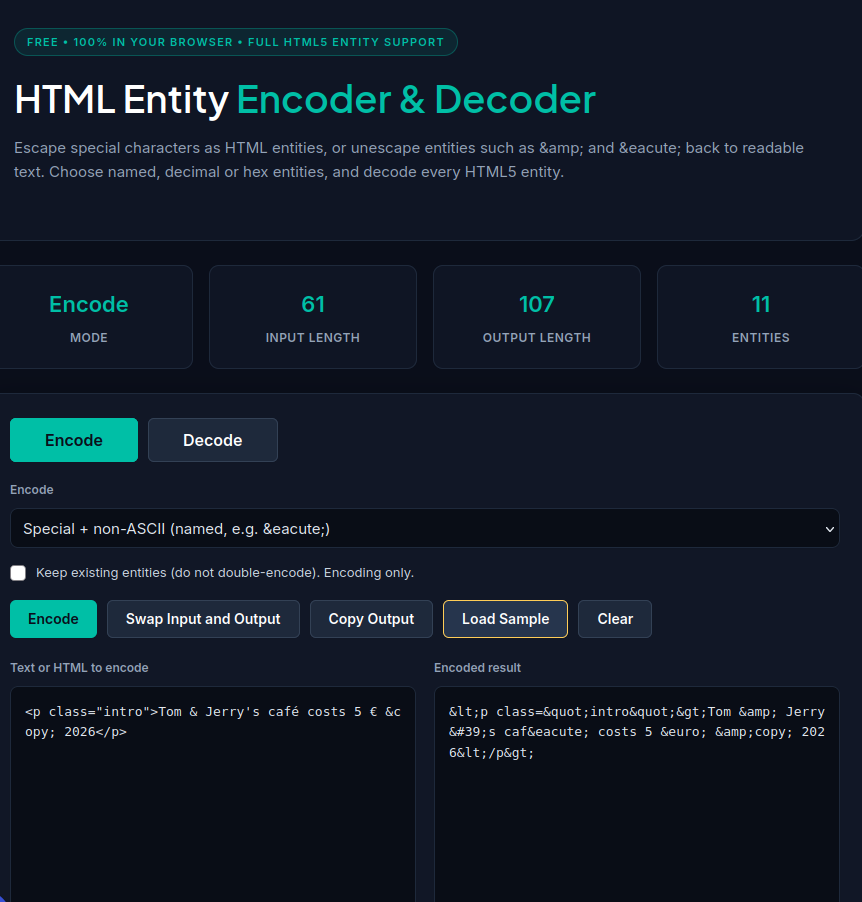
The OffSecPath HTML Entity Encoder and Decoder lets you convert ordinary text into HTML entities and decode entities back into readable text. You can choose different encoding formats and process your text directly in your browser without uploading it to a remote server.
What Is an HTML Entity?
An HTML entity is a character reference used to represent a character in HTML. Named entities generally begin with an ampersand (&) and end with a semicolon (;). For example, < represents the less-than sign, while © represents the copyright symbol.
HTML also supports numeric character references. These use a decimal or hexadecimal number to identify a character.
Here are a few examples:
| Character | Named entity | Numeric entity |
|---|---|---|
| & | & | & |
| < | < | < |
| > | > | > |
| © | © | © |
| € | € | € |
| → | → | → |
When a browser recognizes these references in an appropriate HTML context, it displays the corresponding characters.
For example, the HTML entity < displays as < rather than being interpreted as the beginning of an HTML tag.
What Is an HTML Entity Encoder and Decoder?
An HTML entity encoder converts selected characters into HTML character references. Developers often use this process when displaying code examples, preparing HTML content, or representing special symbols.
An HTML entity decoder performs the reverse operation. It converts recognized HTML entities back into their corresponding characters.
For example:
Original text:
Tom & Jerry
Encoded text:
Tom & Jerry
Decoded text:
Tom & Jerry
The OffSecPath HTML Entity Encoder and Decoder supports both operations through one interface. You can select an encoding mode, enter your text, and copy the result.
How to Encode HTML Entities Online
Follow these steps to convert text into HTML entities using OffSecPath:
- Open the HTML Entity Encoder and Decoder.
- Select Encode.
- Choose an encoding option, depending on which characters you want to convert.
- Type or paste your text into the input area.
- Review the generated output, which updates as you type.
- Click Copy Output to copy the encoded text.
You can also use Swap Input and Output to move the result into the input area and reverse the direction of conversion.
The available encoding options let you choose between escaping important HTML characters and converting non-ASCII characters into named or numeric entities.
How to Decode HTML Entities Online
If you have text containing HTML entities, you can convert it back into ordinary characters.
- Open the OffSecPath HTML Entity Encoder and Decoder.
- Select Decode.
- Paste the text containing HTML entities into the input area.
- Review the decoded output.
- Click Copy Output to copy the result.
For example, decoding Tom & Jerry produces Tom & Jerry.
Decoding is useful when you receive HTML-encoded text from a website, inspect a snippet of HTML, or need to make encoded content easier to read.
Keep in mind that decoding HTML entities does not automatically make the resulting text safe to insert into a webpage. Always consider the context in which the text will be used.
HTML Entity Encoding Options Explained
The OffSecPath tool provides several encoding options for different situations.
| Option | What it does | Example |
|---|---|---|
| Special characters only | Escapes the five important HTML characters: &, <, >, double quotation marks, and apostrophes. | Tom & Jerry |
| Named | Converts non-ASCII characters to named entities when available and uses numeric references when needed. | café €5 |
| Decimal | Represents non-ASCII characters using decimal numeric references. | café €5 |
| Hex | Represents non-ASCII characters using hexadecimal numeric references. | café €5 |
| Keep existing entities | Preserves recognized entities that are already present rather than encoding their ampersands again. | & stays & |
Special Characters Only
This option escapes five characters that commonly need special handling in HTML:
- Ampersand (&)
- Less-than sign (<)
- Greater-than sign (>)
- Double quotation mark (“)
- Apostrophe (‘)
For example, the text Tom & Jerry becomes Tom & Jerry.
This mode is useful when you want to escape these characters without converting every accented letter or other non-ASCII character.
Named Entities
Named entities use readable names where a suitable HTML entity exists.
For example, the character © can be represented as ©, and the euro sign can be represented as €.
This format can make some encoded text easier to recognize. When a named entity is unavailable for a character, the tool uses a numeric reference according to its encoding behavior.
Decimal Numeric Entities
Decimal entities represent a character using its Unicode code point in decimal notation.
For example, the character é can be represented as é, while the euro sign can be represented as €.
This format is useful when you want numeric character references instead of named entities.
Hexadecimal Numeric Entities
Hexadecimal entities represent a character using its code point in hexadecimal notation.
For example, é can be represented as é, and the euro sign can be represented as €.
Hexadecimal references are common in technical examples because hexadecimal notation is widely used in programming and character encoding.
Keep Existing Entities
If your input already contains HTML entities, encoding the ampersand again can change their meaning.
For example:
Original:
&
Encoded again:
&amp;
A browser may display the second value as the literal text & rather than displaying an ampersand.
The Keep existing entities option helps prevent this unwanted double encoding by preserving entities that are already present.
Practical Example: Encoding an HTML Snippet
Suppose you want to display this example as text on a webpage:
<p class="intro">Tom & Jerry's café costs 5 €</p>
If you place the snippet directly into an HTML document, the browser may interpret the markup instead of displaying the complete code as text.
An encoded version could look like this:
<p class="intro">Tom & Jerry's café costs 5 €</p>
The browser can then display the snippet as visible text in an appropriate HTML text context.
This technique is useful for programming tutorials, documentation, educational websites, and pages that show HTML examples.
Why Should You Encode HTML Entities?
HTML entity encoding is useful in several common situations.
Display HTML Code on a Webpage
When you create a tutorial or documentation page, you may want to show tags such as <div>, <p>, or <script> without having the browser interpret them as HTML markup.
Encoding the angle brackets lets you represent those tags as visible text in an appropriate context.
Prevent HTML Characters From Breaking Markup
Characters such as ampersands and quotation marks can have special meanings in HTML. When you use them in the wrong context, they may cause parsing problems or change how the browser interprets the document.
Appropriate character references can help represent these characters correctly.
Represent Special Symbols
Some symbols are difficult to type using a standard keyboard. HTML entities offer an alternative representation for symbols such as copyright signs, registered trademarks, currency symbols, arrows, and non-breaking spaces.
Numeric character references also provide a way to represent characters without relying on a named entity.
Help Reduce Cross-Site Scripting Risks
Cross-site scripting, commonly called XSS, occurs when an application handles untrusted input in a way that allows an attacker to inject executable content into a webpage.
Context-appropriate output encoding is one important defense. When an application inserts untrusted text into an HTML text context, escaping HTML-significant characters helps prevent that text from being interpreted as markup.
However, HTML entity encoding alone does not protect every context. HTML attributes, JavaScript, CSS, and URLs have different requirements. Developers should use context-appropriate output encoding and safe templating practices rather than assuming one encoding method prevents every XSS vulnerability.
Common HTML Entities You Should Know
The following table lists several frequently used HTML entities.
| Character | Entity | Numeric reference |
|---|---|---|
| Ampersand (&) | & | & |
| Less-than (<) | < | < |
| Greater-than (>) | > | > |
| Double quotation mark (“) | " | " |
| Apostrophe (‘) | ' | ' |
| Non-breaking space | |   |
| Copyright (©) | © | © |
| Registered trademark (®) | ® | ® |
| Trademark (™) | ™ | ™ |
| Euro (€) | € | € |
| Em dash (—) | — | — |
| Ellipsis (…) | … | … |
| Right arrow (→) | → | → |
You do not need to memorize these values. The OffSecPath HTML Entity Encoder can generate the appropriate representation for supported characters.
Is HTML Entity Encoding the Same as URL Encoding?
No. HTML entity encoding and URL encoding serve different purposes.
HTML entity encoding represents characters using HTML character references. For example, the less-than sign can be represented as <.
URL encoding represents data using percent-encoded bytes where necessary. For example, a space is commonly represented as %20 in a URL.
Use HTML entity encoding when you need to represent characters in an HTML context. Use URL encoding when preparing data for the relevant part of a URL. Neither method should be treated as a universal substitute for the other.
Does HTML Entity Encoding Encrypt Text?
No. HTML entity encoding does not encrypt information or keep it secret.
It changes the representation of selected characters, but anyone can convert the entities back into their original characters.
For example, <script> represents <script> when the entities are interpreted in an HTML context.
Do not use HTML entities to hide passwords, API keys, or confidential information. Use appropriate security mechanisms when you need to protect sensitive data.
Frequently Asked Questions
What is an HTML entity encoder?
An HTML entity encoder converts selected characters into HTML character references. It helps represent special characters and markup-sensitive symbols in HTML.
How do I convert text to HTML entities online?
Open the OffSecPath HTML Entity Encoder and Decoder, select Encode, choose an encoding option, and enter your text. Copy the generated output when it is ready.
How do I decode HTML entities back to normal text?
Select Decode in the OffSecPath tool, enter the encoded text, and review the resulting characters. You can then copy the decoded output.
What is the difference between named and numeric HTML entities?
Named entities use names such as © or €. Numeric character references use a character’s code point, such as © or €. Numeric references can use decimal or hexadecimal notation.
Why does my text contain & instead of an ampersand?
The string & represents an ampersand in HTML. If you see it as literal text, the content may have been encoded more than once or displayed in a context where the entity is not interpreted.
Does HTML entity encoding prevent XSS?
Context-appropriate HTML output encoding can help prevent XSS when displaying untrusted text in an HTML text context. However, different contexts require different defenses. Encoding alone does not guarantee that an entire application is secure.
Can HTML entities represent emoji and international characters?
HTML supports numeric character references for Unicode characters, including many international characters and emoji. The OffSecPath tool supports encoding text with different languages and symbols using its available modes.
Is the OffSecPath HTML Entity Encoder private?
The tool processes input directly in your browser and is designed not to upload the text to a remote server. This helps limit exposure of the text you enter.
Related Free Tools
Explore more tools on OffSecPath:
- HTML Entity Encoder and Decoder — Encode and decode HTML character references.
- Base64 Encoder and Decoder — Convert text to Base64 and decode Base64 strings.
- JSON Formatter — Format JSON data for easier reading.
- JSON Validator — Check JSON syntax and identify invalid input.
- JWT Decoder — Decode and inspect JSON Web Token components.
Browse the All Tools directory to discover more free online utilities.
Also Read
Continue learning with these guides:
- What Is a JSON Formatter and Validator? How to Format and Validate JSON Online
- Base64 Encoder and Decoder Online for Free
- JWT Decoder Online: Decode JSON Web Tokens and Inspect Claims
Final Thoughts
HTML entities help developers represent special characters, display code examples, and handle text correctly in HTML documents. Understanding named entities, decimal references, hexadecimal references, and existing entity handling can make everyday web development tasks easier.
The OffSecPath HTML Entity Encoder and Decoder provides a simple way to encode and decode text directly in your browser. Choose the appropriate mode, inspect the output, and copy the result into your project.
For security-sensitive applications, remember that HTML entity encoding is only one part of safe output handling. Always use the appropriate protection for the context in which your application displays or processes user input.