
Whether you are writing a blog post, preparing a school assignment, creating website content, or drafting a social media caption, keeping track of your text length can be important. Many platforms and writing tasks have specific word or character limits, and estimating them manually can be time-consuming.
A word counter online makes this process simple. You can paste your text into a tool and quickly check the number of words, characters, and other useful text statistics.
In this guide, we will explain what a word counter is, how it works, why it is useful, and how you can count your words online for free.
What Is a Word Counter?
A word counter is an online tool or software feature that calculates the number of words in a piece of text. Depending on the tool, it may also count characters, sentences, paragraphs, and other text elements.
Word counters are commonly used by students, writers, bloggers, editors, marketers, and developers who need to meet specific content-length requirements.
For example, if an assignment requires 1,000 words, a word counter helps you check whether your writing meets that target. Similarly, bloggers can use one to estimate article length, while social media managers can check whether a caption fits a platform’s character limit.
Why Is Word Count Important?
Word count can help you plan, edit, and organize your writing more effectively.
1. Meeting assignment requirements
Schools, colleges, and universities often specify minimum or maximum word counts for essays, reports, and research assignments. Checking your word count helps you stay within the required range.
2. Writing better blog posts
Bloggers can use word counts to monitor article length and maintain consistency across their content. However, longer content is not automatically better. The goal should be to answer the reader’s question clearly and completely.
3. Checking character limits
Some online forms, advertisements, and social media platforms impose character limits. A character counter helps you check the length of your text before publishing or submitting it.
4. Editing and proofreading
Tracking word count during editing helps you remove unnecessary wording, identify sections that need more explanation, and keep your writing focused.
5. Managing professional content
Copywriters, journalists, translators, and content teams often work with word limits or project-specific requirements. A word counter makes it easier to estimate content length and monitor progress.
How to Count Words Online
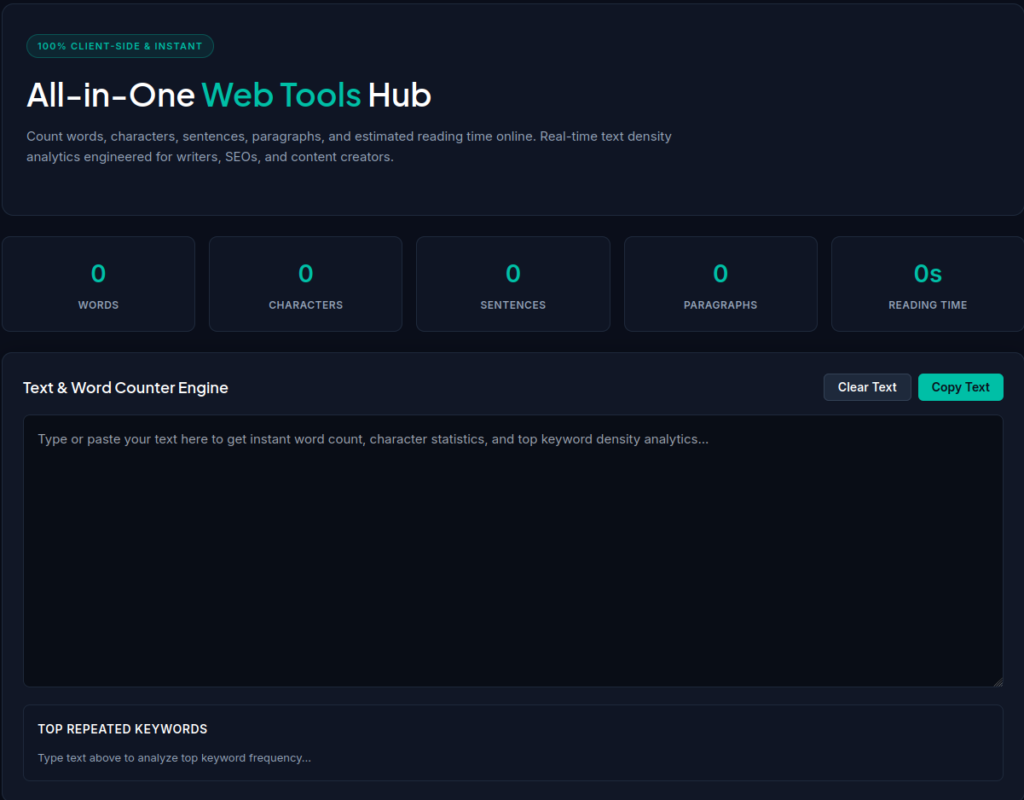
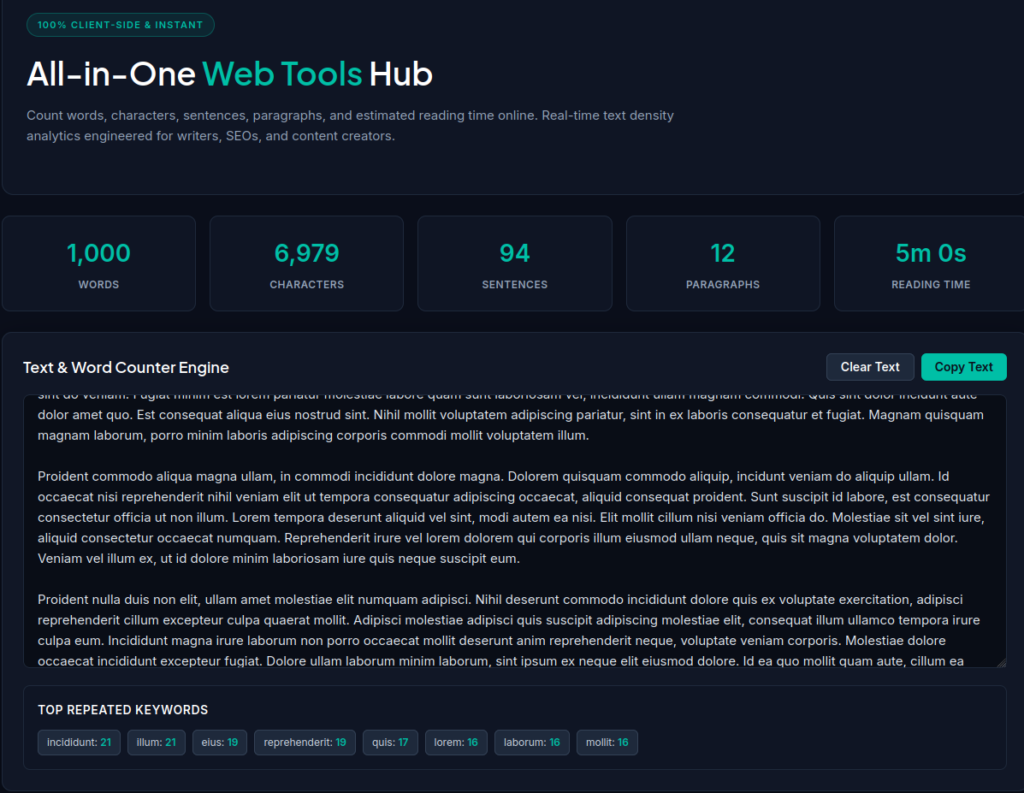
You do not need to count words manually or install special software. You can use the free OffSecPath Word Counter to check your text online.
Follow these steps:
- Open the Word Counter: Visit the OffSecPath Word Counter tool.
- Enter your text: Paste your article, essay, paragraph, or caption into the text area.
- Check the results: Review the displayed word count and any additional text statistics provided by the tool.
- Edit as needed: Add, remove, or revise text to meet your required length, then check the updated results.
The tool is useful when you want a quick count without manually calculating the length of your writing.
What Is the Difference Between Word Count and Character Count?
Word count and character count measure different things.
- Word count measures the number of words in a text.
- Character count measures individual characters, including letters, numbers, punctuation, and spaces when the tool includes them.
- Sentence count estimates how many sentences appear in the text.
- Paragraph count measures the number of paragraphs.
For example, consider this sentence:
“Online tools make writing easier.”
It contains five words. Its character count is different because it includes every letter, the spaces, and the final punctuation mark.
The exact results can depend on how a tool treats punctuation, hyphenated terms, contractions, and whitespace. If you are submitting work under strict requirements, check the counting rules specified by your school, employer, or publishing platform.
Who Can Benefit from a Word Counter?
A word counter can be helpful for many different users.
Students
Students can check essays, assignments, reports, and other academic writing against their required word limits.
Bloggers and website owners
Website owners can monitor article length, edit drafts, and prepare content for publication. A word counter is a useful editing aid, but it does not replace keyword research, fact-checking, or good writing.
Social media managers
Social media managers can review captions and promotional text before publishing. When a platform enforces a character limit, character count is particularly useful.
Freelance writers and copywriters
Freelancers can check whether their work meets client requirements and estimate the length of articles, product descriptions, and marketing copy.
Developers and content editors
Developers and editors may need to measure text in content fields, test sample copy, or check text length while building and reviewing websites.
Can Word Count Affect SEO?
Word count alone is not a reliable way to determine whether a page will rank well in Google Search.
Search engines aim to provide useful results that satisfy a user’s search intent. A short page can be effective when it answers a question directly, while a longer article may be appropriate when a topic requires detailed explanation.
Instead of writing to reach an arbitrary word count, focus on:
- Answering the reader’s main question.
- Providing accurate, original, and useful information.
- Organizing content with descriptive headings.
- Including relevant examples where they help explain a topic.
- Removing repetitive or unnecessary paragraphs.
- Making the page easy to read on desktop and mobile devices.
A word counter can help you monitor article length, but it cannot independently measure content quality or guarantee search rankings.
Tips for Using a Word Counter Effectively
To get the most value from a word counter, follow these simple practices:
- Check requirements first. Confirm the word or character limit before you begin writing.
- Count your text regularly. Review the length while drafting instead of waiting until the end.
- Prioritize clarity. Do not add unnecessary sentences just to reach a target.
- Review the final version. Recheck the count after editing, because even small changes can affect the result.
- Verify strict submissions. Different applications may count certain words, symbols, or formatting elements differently.
Frequently Asked Questions
What is an online word counter?
An online word counter is a web-based tool that calculates the number of words in text you enter or paste. Many tools also provide character counts and other text statistics.
How can I count words for free?
Open a free online word counter, paste your text into the input area, and review the results. You can try the OffSecPath Word Counter to get started.
Does a word counter count spaces?
Spaces generally do not count as words, but they may be included in a character count. The exact behavior depends on the tool.
What is the difference between words and characters?
Words are text units separated according to a tool’s word-counting rules. Characters include letters, digits, punctuation, spaces, and other symbols, depending on the counting settings.
Is word count important for SEO?
There is no universal word count that guarantees better rankings. Useful, relevant, well-organized content matters more than reaching a particular length.
Can I use a word counter for an essay?
Yes. Students can use word counters to check essays and other assignments against specified length requirements. Always follow the counting rules provided by your institution.
Is an online word counter better than counting manually?
For most everyday writing tasks, an online tool is faster and less tedious than counting manually. For formal submissions, compare the result with the software or counting rules required by the recipient.
Conclusion
A word counter is a simple but useful tool for anyone who writes online or works with text. It helps you monitor article length, meet assignment requirements, check character limits, and make editing easier.
Rather than spending time counting words manually, use the free OffSecPath Word Counter to check your text and focus on producing clear, useful content.
Ready to check your text? Open the OffSecPath Word Counter, paste your writing, and review your results in seconds.