
Base64 is a common encoding format used to represent text and binary data using a limited set of characters. Developers use it in applications, APIs, email messages, data files, and other systems that need to transfer or represent data in a text-friendly format.
If you need to convert text into Base64 or turn a Base64 string back into readable text, you can use a free online tool without installing additional software.
The OffSecPath Base64 Encoder and Decoder lets you encode text, decode Base64 strings, and work with URL-safe Base64 directly in your browser. It also supports text from different languages and emoji.
What Is Base64 Encoding?
Base64 is a method of representing data using 64 characters: uppercase letters A–Z, lowercase letters a–z, digits 0–9, and the symbols + and /.
The format converts data into a text representation that works with systems designed to handle text. It is commonly used in email, JSON, XML, data transfer, and web development.
For example, Base64 converts the text Hello into the following string:
SGVsbG8=
The resulting string may look unfamiliar, but it represents the original text. Decoding it converts the Base64 representation back into Hello.
Base64 is an encoding method, not encryption. It does not protect information with a secret key, and anyone with the encoded value can decode it.
What Is a Base64 Encoder and Decoder?
A Base64 encoder and decoder performs two related operations.
A Base64 encoder converts text or supported data into a Base64 representation. This can be useful when an application needs to place data into a format that accepts text characters.
A Base64 decoder reverses the process. It reads a Base64 string and converts it back into the original data when the input is valid and the relevant character encoding is supported.
The OffSecPath Base64 tool provides both operations in one interface, so you can switch between encoding and decoding without using separate utilities.
How to Encode Text to Base64 Online
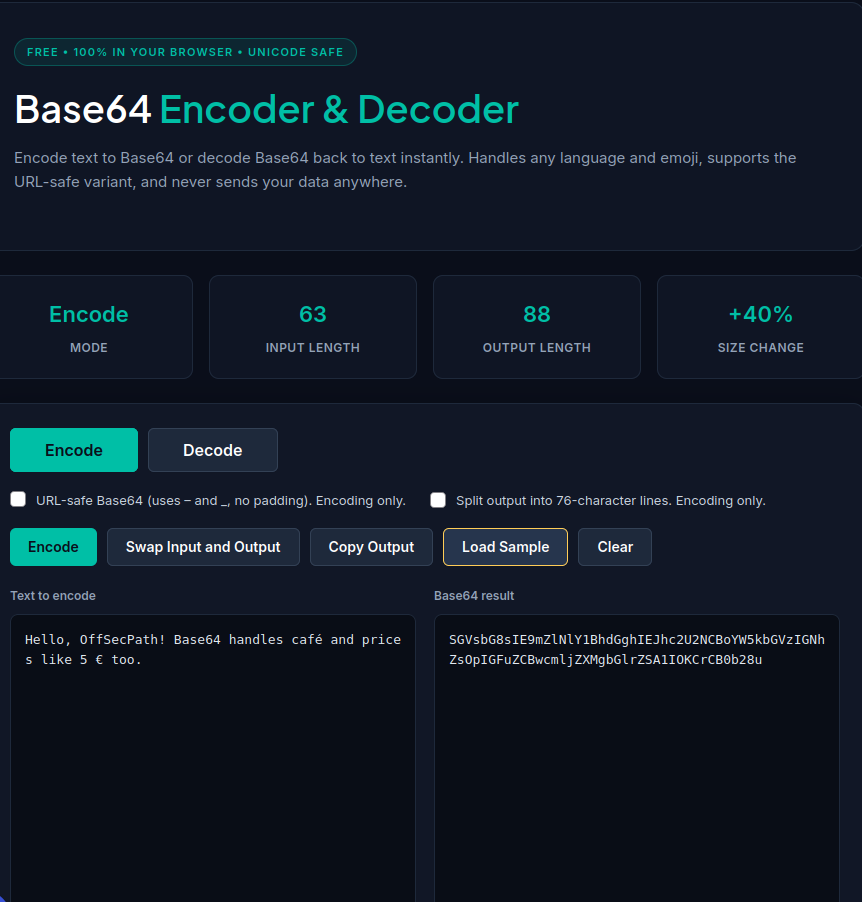
Follow these steps to convert plain text into Base64:
- Open the OffSecPath Base64 Encoder and Decoder.
- Select Encode to convert text into Base64.
- Type or paste your text into the input area.
- Review the generated Base64 output.
- Enable URL-safe Base64 if you intend to use the result in a URL, filename, or compatible token format.
- Click Copy Output to copy the result.
The tool can encode text containing different languages and emoji. This makes it useful when working with international text or characters beyond the basic English alphabet.
You can also use Swap Input and Output to move the generated result into the input area and switch the operation.
How to Decode Base64 Online
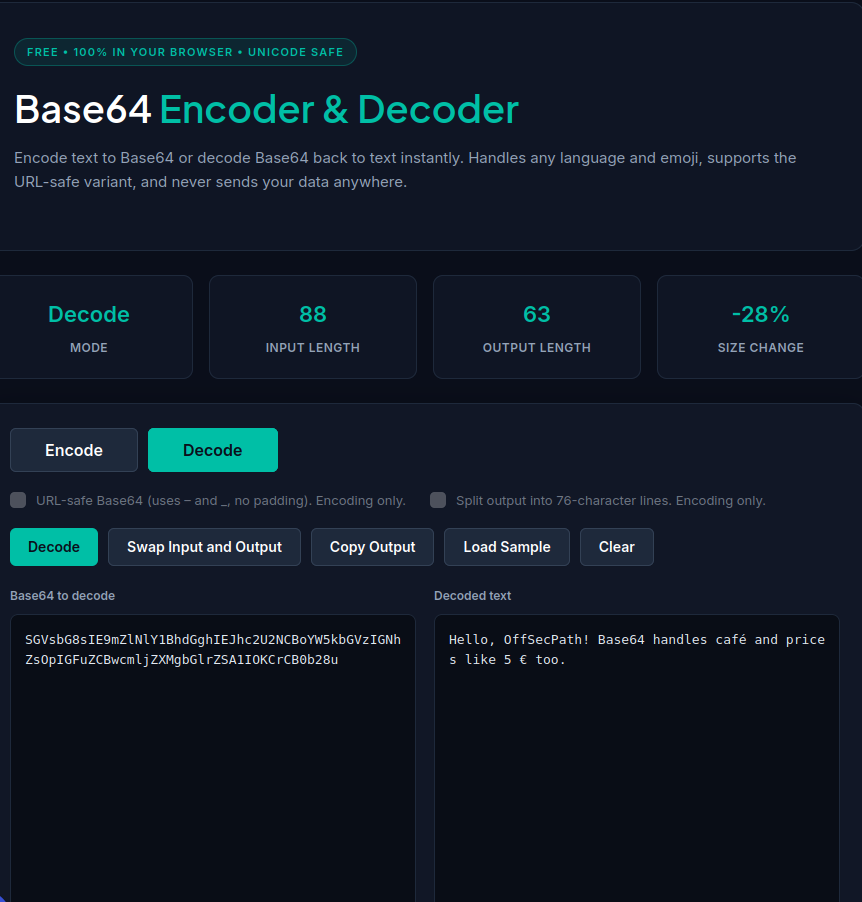
If you already have a Base64 string, you can use the decoder to convert it back into readable text.
- Open the Base64 Encoder and Decoder.
- Select Decode.
- Paste the Base64 string into the input area.
- Review the decoded output.
- Click Copy Output if you want to copy the result.
The tool accepts standard and URL-safe Base64 forms automatically when decoding.
The output depends on the data represented by the input. Base64 may represent text, binary data, or other content. If the decoded data is not text, the result may not display as readable characters.
Base64 Encoding Examples
The following examples show how common text strings look after Base64 encoding.
| Original text | Base64 output |
|---|---|
| Hello | SGVsbG8= |
| Hello, World! | SGVsbG8sIFdvcmxkIQ== |
| user | dXNlcjpwYXNz |
These examples illustrate how encoding changes the representation of the text.
For instance, the Base64 string SGVsbG8= decodes to Hello. The characters at the end, =, serve as padding in standard Base64 encoding.
What Does the Equals Sign Mean in Base64?
You may notice one or two equals signs at the end of a Base64 string.
These characters provide padding when needed to complete the final encoding group. Standard Base64 output is arranged in groups of four characters, so padding can help maintain the expected format.
Not every Base64 string ends with padding. The amount of padding depends on the length of the original data, and some variants omit it.
For example:
SGVsbG8=representsHelloin standard Base64.- Other strings may end with
==when their original data requires two padding characters. - Some URL-safe Base64 representations omit padding.
Padding is part of the encoding format. It does not indicate encryption or additional security.
Standard Base64 vs. URL-Safe Base64
Standard Base64 uses the plus sign (+) and forward slash (/) as two of its 64 characters. These symbols can have special meanings in URLs and filenames, so they may be inconvenient in some contexts.
URL-safe Base64 replaces these two characters:
| Character | Standard Base64 | URL-safe Base64 |
|---|---|---|
| First character | + | - |
| Second character | / | _ |
URL-safe Base64 may also omit trailing padding characters.
This variant is useful when data needs to fit into URLs, filenames, or formats that use URL-safe Base64. JSON Web Tokens, for example, use Base64URL-encoded components.
The standard and URL-safe forms are related, but they are not always interchangeable without conversion. Use the variant expected by the application or format you are working with.
The OffSecPath tool provides a URL-safe Base64 option for encoding and accepts both standard and URL-safe forms when decoding.
Is Base64 Encryption?
No. Base64 is encoding, not encryption.
Encoding changes how data is represented. Encryption uses a cryptographic process to protect information, usually requiring a key to decrypt it.
For example, encoding the text user:pass produces:
dXNlcjpwYXNz
Anyone who recognizes the format can decode that string and recover the original text.
For this reason, you should not use Base64 alone to protect passwords, API keys, private messages, or other sensitive information.
If you encounter a Base64 string in a configuration file, web request, or application response, remember that the contents may be readable after decoding. Encoding does not make confidential data safe to share.
Is the OffSecPath Base64 Tool Private?
The OffSecPath Base64 Encoder and Decoder performs its encoding and decoding operations directly in your browser. The tool is designed to process the input locally rather than send it to a remote decoding server.
This approach can reduce the exposure associated with sending text to an external processing service.
However, local processing does not make Base64 secure. Avoid sharing sensitive information unnecessarily, and remember that encoded data can be decoded by anyone who obtains it.
Common Uses of Base64
Base64 appears in many types of software and data-processing workflows.
Web Development
Applications sometimes use Base64 to represent data within text-based formats or to transfer data through interfaces that expect text.
APIs and JSON Data
Developers may encounter Base64-encoded values in API requests and responses. The encoding can help represent data within a text-based structure.
Email Attachments
Email systems commonly use Base64 to represent binary attachment data within message formats designed to carry text and other content.
Data URLs
Web pages can use Base64 representations in data URLs to embed certain types of content directly within a URL.
JSON Web Tokens
JSON Web Tokens use Base64URL-encoded header and payload components. These components can be decoded for inspection, but decoding does not verify the token’s signature or establish that its contents are trustworthy.
If you need to inspect a JWT, use the OffSecPath JWT Decoder.
Frequently Asked Questions
How do I convert text to Base64?
Open the OffSecPath Base64 Encoder and Decoder, select Encode, enter your text, and copy the generated output. You can enable URL-safe Base64 if your intended application requires that format.
How do I decode a Base64 string?
Select Decode in the OffSecPath tool, paste your Base64 string, and review the output. The tool accepts standard and URL-safe Base64 forms.
Can Base64 handle different languages and emoji?
Yes. The OffSecPath tool supports text from different languages and emoji. The exact result depends on the text’s character encoding and the data being represented.
Why does my Base64 string end with an equals sign?
The equals sign is used as padding in standard Base64 when needed to complete the final encoding group. URL-safe Base64 representations may omit this padding.
What is the difference between Base64 and URL-safe Base64?
Standard Base64 uses + and /. URL-safe Base64 replaces them with - and _ and commonly omits trailing padding. The correct form depends on the format or application that will use the value.
Can I use Base64 to secure a password?
No. Base64 does not encrypt or protect a password. Anyone can decode a Base64 representation without a secret key. Use an appropriate password-hashing or secure authentication system instead of relying on Base64.
Does Base64 always produce readable text when decoded?
No. Base64 can represent binary data as well as text. When the decoded data is not text, it may not display as readable characters.
Is Base64 encoding reversible?
Yes, provided the Base64 data is valid and you decode it correctly. Encoding and decoding are designed to recover the represented data, subject to the correct character encoding and data handling.
Related Free Tools
Explore these additional tools on OffSecPath:
- Base64 Encoder and Decoder — Encode text to Base64 and decode Base64 strings.
- JWT Decoder — Inspect JWT headers, payloads, and claims.
- JSON Formatter — Format JSON data for easier reading.
- JSON Validator — Check JSON syntax and identify invalid input.
- Secure Password Generator — Generate passwords with configurable character options.
Browse the All Tools directory to find more free online utilities.
Also Read
Explore more practical guides on OffSecPath:
- What Is a JSON Formatter and Validator? How to Format and Validate JSON Online
- JWT Decoder Online: Decode JSON Web Tokens and Inspect Claims
- How to Convert CSV to JSON Online for Free
Final Thoughts
Base64 is a widely used format for representing text and binary data in a text-friendly form. It can help with data transfer, web development, email attachments, and applications that need a consistent textual representation.
The OffSecPath Base64 Encoder and Decoder makes it easy to encode text, decode Base64 strings, and work with URL-safe Base64 directly in your browser.
Remember that Base64 is not encryption. If your goal is to protect sensitive information, use an appropriate security mechanism rather than relying on encoding alone.